Premade Cover Design and Stock Sites

Alert to cover designers using stock sites (nothing too horrible, just thought you might want to know):

I’ve been looking into the idea of doing premade book cover designs, and have thought about picking up a subscription plan at a stock site to do so. However, I was recently alerted to terms in several stock sites that make this a less feasible option. Subscription plans (at least at Dreamstime and Shutterstock) only include the basic or Royalty Free licences. Premade book covers are often considered “merchandise made for resale,” even if you plan to only sell them to one client. Different sites require different licences, so be sure to check with the site (possibly contact them directly, which I did), to check their terms of use.

I try to note any special terms (like number of copies permitted, and what an image can be used for) in my contract. πŸ™‚

Just a heads up, whenever you’re planning on using stock sites, be sure to check their terms, and verify the terms that may be an issue for your work. For example, be warned that some stock sites don’t want their models being used on erotica book covers. You may want to go to a site specifically based on selling romance covers for models in this case. Same goes with “sensitive subjects.”

Either way, it doesn’t hurt to ask, and if you’re using your own photography or collaborating with another artist, premade covers shouldn’t be a problem. πŸ™‚

Leave a comment

Filed under Book Covers, Business Ventures, Personal Work, Photo Illustration, Writing

Swann Saga – Cover Reveal

This is a series set of covers for Melange Books. They asked me to redo the current set, so this is what we came up with. My goal was that each would have a coherent feeling of being part of a series, while also setting the mood. In order to do that, I used the same font and relative placement for the title and author name. I also framed the images with the same leaf texture, and had the faces at the same general placement and size. Something to consider whenever creating a series of covers is how to keep them consistent. πŸ™‚

SBibb - Swann Saga CoverΒ SBibb - Swann Saga CoverSBibb - Swann Saga Cover

Stock images from Dreamstime.

Leave a comment

Filed under Book Covers, Photo Illustration

Cover Reveal – Slip Sliding Away

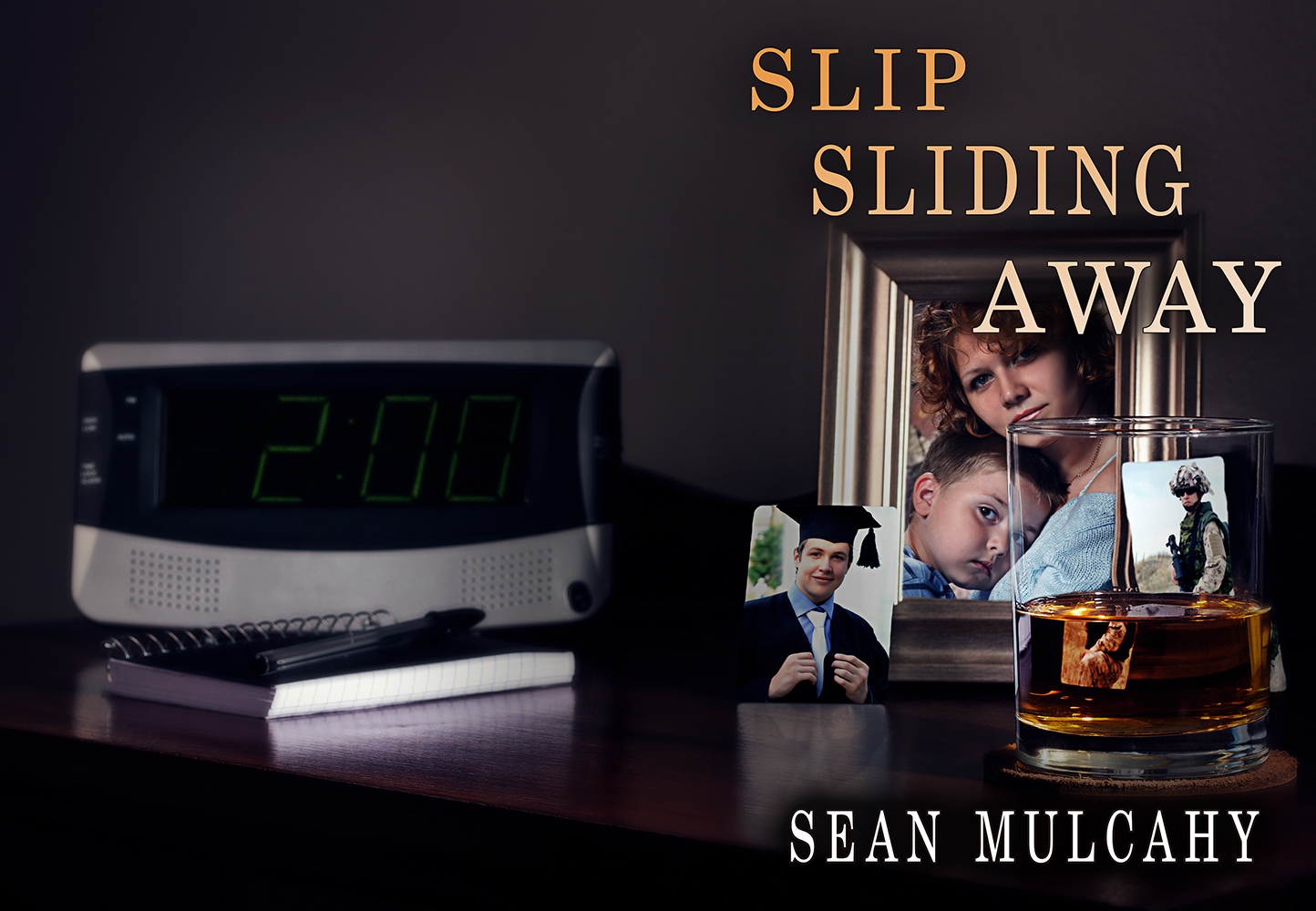
This is a wrap around cover I did for Barking Rain Press.

(You can find the book here:Β http://www.barkingrainpress.org/dd-product/slip-sliding-away/Β ).

SBibb - Slip Sliding Away

(See a larger version on my Deviant Art Account:Β http://sbibb.deviantart.com/art/Slip-Sliding-Away-Cover-394872911Β )

For this particular cover, I actually did a photoshoot (three, to get the angle and items right) of my own. The publisher wanted a desk with the drink on it and the photos, and when I first started trying to put it together with stock, I realized I’d have a much easier time if I just set the shoot up myself (especially since we’d just finished that dresser…. which worked well for a desk setting). I set up the glass, notepad, and alarm clock, as well as used an empty picture frame and two gift cards to hold the place for the photos. (Note to self: Next time someone has the stock photos they want used already picked out, just print them off and put directly in the image… it’ll save editing time later). I also changed the card reflections to that of the stock photos (from Shutterstock). For the alarm clock, I quickly discovered the numbers weren’t going to appear on their own (same reason you can’t have your shutter speed faster than 1/200 or you get a black line through your image). We had considered using a digital font for the numbers on the clock, but I found the LEDs just faintly showed in the image, had so I used the overlay tools to bring out the parts I needed.

I also changed the color of the overall image so it’d look more like night (I played with in-camera color settings, but found Photoshop was a bit more versatile for me). I did try to angle the lights (Alien Bees) so they’d look more like a lamp or low window.


Leave a comment

Filed under Book Covers, Client Work, Photo Illustration

Cover Reveal – The Light of Day

Today we have another cover for Melange Books. This one was fun to do, largely in part because of playing with expression to achieve the mood I wanted to convey. For example, take a look at this stock photo: (http://www.dreamstime.com/royalty-free-stock-image-female-health-care-worker-image22294246) and compare her expression to the final cover. Liquefy filter and puppet warp tool in Photoshop– extremely useful. I made it so she no longer had as wide of a smile (based on the description of the book, I didn’t think a super cheerful tone would be in the cover’s best interest). Once I eliminated the teeth, I raised the chin, tweaked the corners of her eyes and lips, and even changed the nose and wrinkles of the cheeks just slightly to achieve the desired effect.

The other big edit that came for this one was using multiple pictures for the guy in front. Since he was supposed to be in a hospital gown, I had to add that in, which meant I needed to show more of his back. As a result, I merged three different images together to create the final picture.

And, on a final note: When you need a certain angle but the stock photo cuts off too soon on the person, the strategic placement of colorful title bars can prove useful. πŸ™‚

SBibb - The Light of Day Cover

Photoshop CS6.

Stock photos from: Dreamstime:

http://www.dreamstime.com/royalty-free-stock-image-female-health-care-worker-image22294246
http://www.dreamstime.com/stock-photos-black-business-man-image1723303
http://www.dreamstime.com/stock-photo-docotor-s-office-image11152240
http://www.dreamstime.com/royalty-free-stock-photo-portrait-young-female-doctor-examining-male-patient-image29672475
http://www.dreamstime.com/stock-photos-young-african-american-man-flexing-triceps-his-studio-shot-image30583323

Leave a comment

Filed under Book Covers, Client Work, Photo Illustration

Twitter Me This

For today’s post, I’m going to briefly tangent my usual cover work posts to a post about twitter. I’ve had a twitter account for a while now, but I really couldn’t really say I tweeted. Mostly, I used it to keep up to date with industry news. Since it’s used for small amounts of texts, Twitter works great for people and businesses to posts links to news or other blog posts, usually with a little tag noting what it’s about. When I first set up my account, I followed publishers, agents, and authors whose blogs I admired. It was a great way to keep up with news, find out new information I was interested in, and generally keep up to date without having to read every blog post out there.

I pretty much watched Twitter invisibly for several months. Then, here recently, I realized there were some links I wanted to be able to return to easily to refresh my memory (writing advice, mostly), and my favorites folder is invariably overwhelmed by random links. So, I started using the retweet function. The posts now show up on my Twitter feed so I can see them again easily, but also, so I can share blogs I found useful easily. I recently updated my photo and header to make it a bit more unique.

Just thought I’d share. It’s been a useful way to sort through information. πŸ™‚

And, in case you’re curious, you can follow me atΒ https://twitter.com/SBibbPhoto

Leave a comment

Filed under Book Covers, Personal Work, Photo Illustration, Writing

The Blind Vampire Hunter – Cover Reveal

Another cover for Melange Books. For this one, I got to have a bit of fun with piece-parting images together (we wanted a very specific kind of cane with the older man, and part of it I digitally illustrated), as well as manipulating expression. (If you look at the original image for the vampire, she has a slightly different expression. Eyes, eyebrows, and mouth changed position slightly to get the effect I was wanting for the cover. Goes to show that the liquefy and puppet warp tools can both be extremely helpful when you’re trying to achieve a specific mood. Also helpful when you have a stock image that isΒ almost what you want, but not quite right. πŸ™‚


SBibb - The Blind Vampire Hunter - Book Cover

Photoshop CS6

Stock from Dreamstime:

http://www.dreamstime.com/royalty-free-stock-image-fashion-hard-rock-girl-black-cloak-image29546626

http://www.dreamstime.com/stock-image-grandfather-blowhole-boss-man-thinks-portrait-cane-image31520111
http://www.dreamstime.com/royalty-free-stock-image-family-home-night-image19659116
http://www.dreamstime.com/royalty-free-stock-photo-thoughtful-older-man-image24460795

Leave a comment

Filed under Book Covers, Client Work, Photo Illustration

Rough Drafts and Refurnishing Old Furniture

Over the past summer, my husband and I have been working on a project renovating a set of old furniture that has run in his family for a few generations. It skipped a generation, however, and has been stored for quite some time in an old farmhouse with no conditioning, mostly untouched. When we set out on the project, the idea was to have something we could do together and look back in future years and know we did together (especially since it would be something from early in our marriage), as well as to have a nice bed frame, chest of drawers, and changing table to add to our apartment (not that our apartment isn’t crowded enough as it is, but…).

Now, I know I normally stick to talking about book cover design and photoshop stuff here on the blog, but today I’m switching gears to talk about writing and my writing process.

How do refurnishing furniture and rough drafts relate?

Well, when looking at the furniture, my husband and I had to decide whether to simply repaint it, or stain it. Either way we needed to strip it down to wood, but we wouldn’t have to do quite such a good job stripping it if we were repainting it. However, being that this furniture dated back to sometime around the 1920s or 30s, that meant we were likely dealing with lead based paint, and we thought staining would look better anyway.

What we didn’t know was that this furniture hadn’t been painted two or three times, like we’d expected, but somewhere around five layers of stubborn paint that hid in the little grooves of corners and refused to be removed by a simple process. It required paint stripper (that blue, snot-like goo that burns if you get it on you… and worse if you accidentaly get some on the back of your shoe then sit on your shoe). Consider this the rough draft. We applied the paint stripper, let it set, then came back and removed what we could. There were still several layers of pink and white and green and some sort of yellow-ish color waiting in chunks around the corner, but once that was done, we could see wood. Yay!

Once the stripping was complete, then came the sander. We used it where we could, where flat surfaces permitted, and it really helped, but those corners were still elusive. Another edit, so to say.

Corners. This was the fine tuning, trying to work out those little kinks that just won’t go away. We tried sand paper. We tried a razor blade (which was mildly-helpful), and we tried one of those sanding foam blocks. Little trick we discovered– a stiff toothbrush and more paint stripper works wonders. Didn’t figure that out until half-way through the process, though, and like writing, its one of those things you learn by trial and error. (And a bit of help from both parents pointing out possible suggestions).

Eventually, we got everything sanded. We went from 100 grit sandpaper to 220 sandpaper, and polished it up. Got the wood nice and smooth. Stained it. Applied polyurethane. Applied another coat of polyurethane… and another… and it wasn’t until the second-to-last piece of furniture I figured out the trick to getting it to come out smooth. It dried quickly, so if I tried to go back and smooth out a partially dry spot, all I did was leave ridges in the coating. Granted there was more to it than that, but it was like fine tuning a manuscript. Finding the little errors, trying to fix them, and realizing that no matter how many corners you remove paint from, there’s still going to be some speck of pink paint shining through the stain when everything’s said and done (though luckily in an unobtrusive place). I’ve read many times that there’ll still be things you want to correct, even after a manuscript has been edited and polished and published.

We’re still working on the project as of my writing this, being that we can only work on it while visiting my husband’s parents (and they live an hour-and-a-half away from where we live). But it occurred to me that revising a manuscript is much like refurnishing the old furniture. Takes time, can be a bit of a pain, but you still feel a sense of excitement upon seeing it all come together, when everything’s been stained and smooth… or edited and reads as smooth as piece of furniture.

Leave a comment

Filed under Personal Work, Writing

Cover Reveal – Penny Pony and Nickel-Bred

I know I usually just show one cover at a time, but in this case, I wanted to talk about creating book covers that are meant to be part of a series. These two covers are for Melange Books’ young adult line. In this case, I worked with the author to find images that worked well for the book (and in the case of Nickel-Bred, the author actually suggested the picture from Dreamstime, and it worked well without needing to be changed). For these covers I had set a specific style of editing and formatting. A block of color above and below the photo, with the title on top and the author’s name at the bottom. Position varied a bit, but I kept the same font in both. Keeping the scheme the same, it should be easily visible that they are of the same series or type of book. Also, being that they are meant to be of a more realistic/contemporary nature, I didn’t do a whole lot of extra editing. I did edit for lighting effects (see the stock images listed below for the changes), and on The Penny Pony I changed spot color and added ear tufts per the author’s request.

So, even thought the colors are different, the style remains relatively similar. Something to think about if you’re designing a cover or having one designed, is how well can you tell the book are of the same “brand” or series.

SBibb - Penny Pony CoverΒ SBibb - Nickel-Bred Cover


Stock Images for The Penny Pony:

http://www.dreamstime.com/stock-image-appaloosa-pony-portrait-image20085031
http://www.dreamstime.com/stock-photo-appaloosa-coat-image888990

Stock Images for Nickel-Bred:

http://www.dreamstime.com/stock-photos-arabian-horse-portrait-image12661463
http://www.dreamstime.com/royalty-free-stock-images-arabian-horse-image25455479


Photoshop CS6, as usual. πŸ™‚


By the way, if you didn’t know, you can find my work at my Deviant Art account, where I usually upload book covers before I talk about them here. πŸ™‚

http://sbibb.deviantart.com

Leave a comment

Filed under Book Covers, Client Work, Photo Illustration

Wolfman Owner’s Manual – Book Cover Reveal

Today we have a cover a bit different from the romance covers I’ve been doing. Today we have a cover for the horror genre from Melange Books. πŸ™‚

SBibb - Wolfman Owner's Manual Book Cover


Let me tell ya, this was fun to do. One, because it involved the anthropomorphic art I enjoy (yay, werewolf!), and two, because it involved a lot of the photographic manipulation I also enjoy doing. Take a look at the original stock images from Dreamstime:

http://www.dreamstime.com/royalty-free-stock-image-timber-wolf-growling-iii-image8983996
http://www.dreamstime.com/royalty-free-stock-image-shirtless-young-athletic-man-growling-outdoors-park-beijing-image31106656
http://www.dreamstime.com/royalty-free-stock-photography-young-woman-screaming-image10656977

In order to create the wolf (which, while working with the author, I realized needed to be more werewolf-like and less anthro wolf), I used a human base to get the pose and body structure. Then, using the wolf image, I cut and pasted sections of fur across the body, paying attention to the direction of the fur. I varied the opacity in areas on the face and chest in order to show just a bit more of the body structure underneath. I also cut and pasted section of the wolf’s face along the man’s face so it fit better. Then the puppet warp tool, the perspective and skew tools, and the smudge tool, became very good friends. Β They helped to get the wolf-man look I was aiming for. I added in the girl, gave the wolf-man an arm, and played with lighting (opacity layer) to make everything fit together, then finally added the text. The background I did in the early stages.

Of course, one of the factors that gets to come into play with creating an image with a lot of variation due to the puppet warp tool is that the final image doesn’t look quite like the proof image. A section of fur isn’t laid the same, the mouth doesn’t angle quite right. When that happens, I try making the image stronger than it was before, using what I learned in the initial set-up to make the final look more complete. In this case, something wasn’t quite right. The wolf didn’t look as imposing as before. So I made a copy of the image as a whole on a new layer (Ctrl+Alt+Shift+E) and used the perspective tool to make the wolf just a bit bigger, a bit closer, and the girl a bit smaller. The change was subtle, but did a lot to help. πŸ™‚

4 Comments

Filed under Book Covers, Client Work, Photo Illustration

JoAnna’s Rescue – Book Cover Reveal

Hello again, long time no-see. But, fear not, I have a book cover to reveal. πŸ™‚

SBibb - JoAnna's Rescue Book Cover

Today we have “JoAnna’s Rescue,” another cover for Melange Books. This one is for a romance novel. This is another case where a collaboration between the author and illustrator can work out well. In this case, the author had an idea of what she wanted, and provided links to a couple images (from Dreamstime) that she thought might fit. However, we wanted a snowy, blizzard look, so I photoshopped in the snow and put the images together. In the long run, the publisher suggested we might also want the guy’s face on the cover (to suggest the romance aspect of the novel), but we didn’t want it to be the main focus. So the author found one she liked (Fotolia), and I added it in, blurring the image a bit an lowering the opacity so that, while it is closer to the viewer, it isn’t the first thing to catch the eye. πŸ™‚

Photoshop CS6.

Stock images from Dreamstime and Fotolia:

http://www.dreamstime.com/stock-photography-country-scene-farm-house-winter-image24715572
http://www.dreamstime.com/royalty-free-stock-photo-winter-portrait-young-beauty-image26384705
http://us.fotolia.com/id/27527058

2 Comments

Filed under Book Covers, Client Work, Photo Illustration